How to transcribe (almost) any video or podcast URL on your Mac
Transcribe YouTube, Loom, Vimeo, TikTok, Facebook, X, and podcast links on your Mac. What stays local, what needs the network, and CLI examples.
Most people meet MacParakeet as two things: a dictation hotkey, and a box you drop audio files into. Both are true. There is a third workflow that deserves more attention: you can paste almost any video or podcast link into the Transcribe field, and it works.
Not only YouTube. A Loom share link. A Vimeo URL. A Facebook reel. A Twitch VOD. An Apple Podcasts episode. A TikTok. Most of what you can open in a browser, MacParakeet can turn into text — on your Mac, with nothing uploaded to a transcription service.
The limits matter: what “any link” means, what “local” means, where downloads fail, and how to script the workflow if you live in a terminal.
What “any link” actually means
Under the hood, MacParakeet hands the link to yt-dlp — the same open-source downloader that powers a huge slice of the “download a video” tools on the internet. yt-dlp supports around a thousand sites, and MacParakeet deliberately doesn’t keep a short allowlist. If a link looks like media, the app lets yt-dlp try it; if the download fails, it tells you.
A handful of platforms get a recognized name and icon when you paste them:
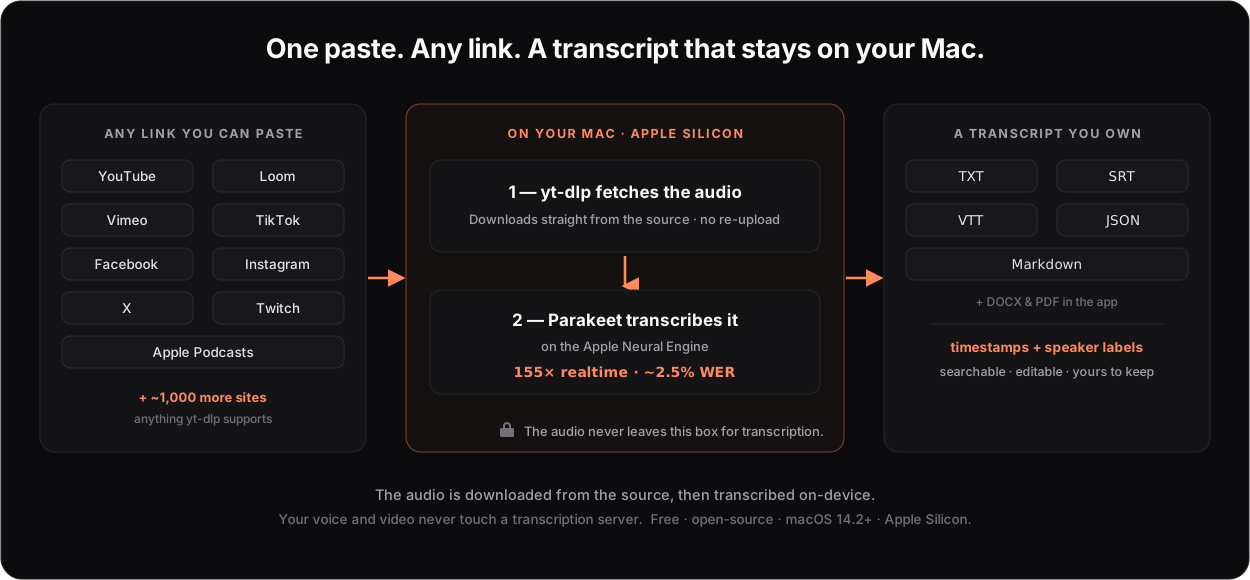
YouTube, X (Twitter), Vimeo, Facebook, TikTok, Instagram, Apple Podcasts, SoundCloud, and Twitch are the ones with a brand glyph. Everything else still flows through the same path — it just shows a generic mark. The point isn’t the list; it’s that the list isn’t a fence.
What happens after you paste
Three things, in order:
- yt-dlp fetches the audio from the source. This is the one step that needs the internet — the audio has to come from the site you linked.
- Parakeet transcribes it on the Apple Neural Engine. This is local. The model runs on your Mac’s dedicated ML chip at roughly 155× realtime with about a 2.5% word error rate on English. A three-hour file is done in about a minute.
- You get a transcript you own — copy it, or export TXT, Markdown, SRT, VTT, JSON, DOCX, or PDF, with timestamps and speaker labels.
The distinction matters: “local” describes the transcription, not the download. The audio is pulled from the source over the network — there’s no way around that for a remote URL. But your audio is never uploaded to a transcription server, there’s no account, and the speech recognition itself never leaves your machine. The only other thing that can leave is an optional summary, and only if you choose to send a transcript to your own LLM provider.
Why this beats pasting into a web tool
Search “transcribe a Loom video” or “TikTok to text” and you’ll find dozens of browser tools. They’re genuinely convenient for a 90-second clip. But they share a shape that gets old fast:
| MacParakeet | Typical web transcriber | |
|---|---|---|
| Where your audio goes | Stays on your Mac | Uploaded to their servers |
| Free tier | Unlimited | Often 3–10 minutes, then a paywall |
| Length cap | None | Common — long files choke or cost |
| Account | None | Usually required |
| Sources | ~1,000 sites (yt-dlp) | Often one platform |
| Price | Free, open-source | Freemium or subscription |
If you’re transcribing a two-minute clip once, a web tool is fine. If you’re transcribing an internal product walkthrough, a six-hour stream, a sensitive interview, or a whole back catalog, the upload and the cap and the meter stop being acceptable. That’s the gap MacParakeet fills — not by being fancier, but by running the work where the file already is.
The part developers love: it’s a CLI, too
The same engine ships as macparakeet-cli. Install it standalone with Homebrew:
brew install moona3k/tap/macparakeet-cli
macparakeet-cli health --json
Now the URL trick becomes scriptable. One command downloads and transcribes a link:
macparakeet-cli transcribe "https://www.loom.com/share/<id>" --format jsonAdd more links and an output directory, and it becomes a walk-away batch — one transcript per input, continuing past any that fail:
macparakeet-cli transcribe \
  "https://www.loom.com/share/<id>" \
  "https://vimeo.com/<id>" \
  "https://www.twitch.tv/videos/<id>" \
  --output-dir transcripts --format json
For agents, this turns a headless Mac mini — silent, ~8 watts at idle, with a Neural Engine and unified memory — into a local transcription worker. Hermes, OpenClaw, or Claude Code can turn a list of links into a folder of transcripts and summaries while you sleep.
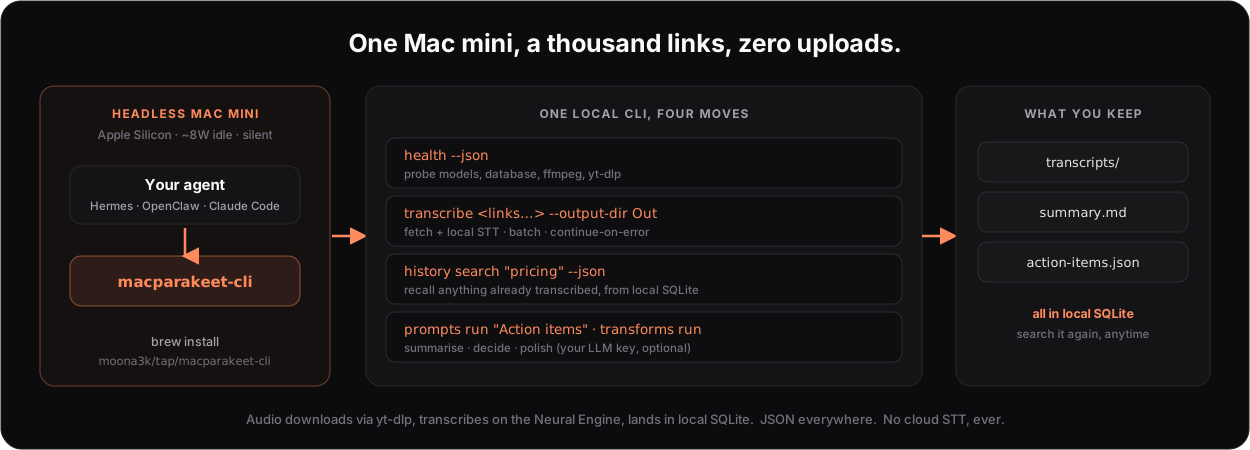
Because every transcript lands in a local SQLite database, the agent can search what it already transcribed instead of redoing it:
macparakeet-cli history search-transcriptions "pricing" --jsonAnd it can slice and dice — summaries, action items, custom rewrites — through your own LLM key, which only runs when you ask for it:
macparakeet-cli prompts run "Action items" \
  --transcription <id> --provider anthropic --api-key-env ANTHROPIC_API_KEY --json
Speech-to-text and database access never touch the network. The bounded egress paths are the media download (yt-dlp), optional cloud LLM calls you opt into, and update checks for the app. There’s a fuller walkthrough on the agent & CLI page.
The honest caveats
The limits are practical:
- Apple Silicon only. macOS 14.2 or later, M1 or newer. Parakeet runs on the Neural Engine; there’s no Intel build.
- Downloading needs a connection. Remote URLs are fetched over the network. After that, transcription is offline.
- Only what you can access. Private, login-only, or DRM-protected media generally can’t be downloaded — that includes Spotify-exclusive podcasts and password-protected videos. Use a public link you have the right to use, and respect each platform’s terms of service.
- English is sharpest. Parakeet covers 25 European languages by default; the optional WhisperKit engine adds Korean, Japanese, Chinese, and 73 more for 98 languages total. Clean-text post-processing is tuned for English.
- Audio quality still matters. Studio audio transcribes beautifully; heavy music beds, overlapping speakers, and phone-quality clips produce more errors, as they would with any engine.
Try it on a link you have right now
Grab any video or podcast URL you’re allowed to transcribe and paste it in. The first run downloads the model; after that, even an hour-long recording is done in well under a minute.
- Transcribe any video or podcast URL — the overview, with the platform list
- Loom · Vimeo · Twitch VODs · Facebook · X / Spaces · Podcasts
- Just a short clip? Use the free in-browser transcriber — nothing to install, nothing uploaded.
Download MacParakeet — free, open-source, and no account. Then paste your first link and produce the transcript on your own machine.