Paste a link · Local · Free
Transcribe any video or podcast URL — on your Mac, not in the cloud.
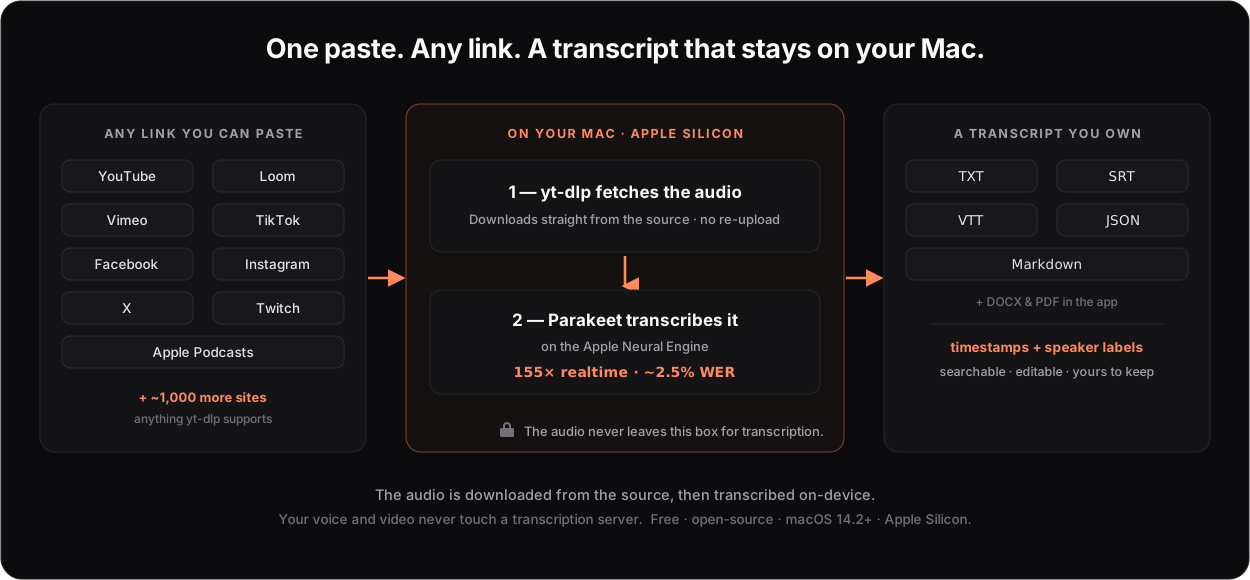
Paste a link from YouTube, Loom, Vimeo, TikTok, Facebook, X, a podcast — anything yt-dlp supports — and MacParakeet downloads the audio and transcribes it locally at ~155× realtime with a ~2.5% error rate. No upload to a transcription cloud. No account. No length cap.
macOS 14.2+ · Apple Silicon · Free & open-source · no account
One paste, start to transcript
The audio is fetched from the source, then everything else happens on your Mac. Your voice and video never touch a transcription server.
Works with the link you already have
Pick a platform for a step-by-step guide, or just paste your link into the app.
YouTube
→Caption extractor or full transcribe
Loom
→No length cap, no account
Vimeo
→Clean studio audio
Twitch
→Full 6-hour VODs
Public videos & Reels
X (Twitter)
→Video posts & Spaces
Apple Podcasts
→Or search by name
Also supported, no dedicated guide needed:
+ ~1,000 more sites — anything yt-dlp supports.
Three steps. Then it's text.
Copy a link
A YouTube watch URL, a Loom share link, a podcast episode — whatever you can open in a browser and have the right to use.
Paste it into MacParakeet
The Transcribe tab downloads the audio and runs Parakeet on the Neural Engine. A 3-hour file is done in about a minute.
Keep the text
Copy it, or export TXT, Markdown, SRT, VTT, or JSON — with timestamps and speaker labels. Yours to search and edit.
Honestly, about "local": downloading the media needs a network connection, because the audio comes from the source site. After that, the speech recognition is entirely on-device — no cloud STT, no transcript shipped to a server, no account. The only things that ever leave your Mac are the download itself and, if you opt in, an optional summary sent to your own LLM provider.
Or do it from the terminal — and let an agent run it
The same engine ships as macparakeet-cli. Point a headless Mac mini and an agent at it, and a list of links becomes a folder of transcripts and summaries — overnight, locally.
# transcribe a batch of links, one transcript each, keep going on errors
$ macparakeet-cli transcribe \
    "https://www.loom.com/share/<id>" \
    "https://www.facebook.com/reel/<id>" \
    "https://vimeo.com/<id>" \
    --output-dir transcripts --format json

# then summarise with your own LLM key (optional)
$ macparakeet-cli prompts run "Action items" \
    --transcription <id> --provider anthropic --api-key-env ANTHROPIC_API_KEY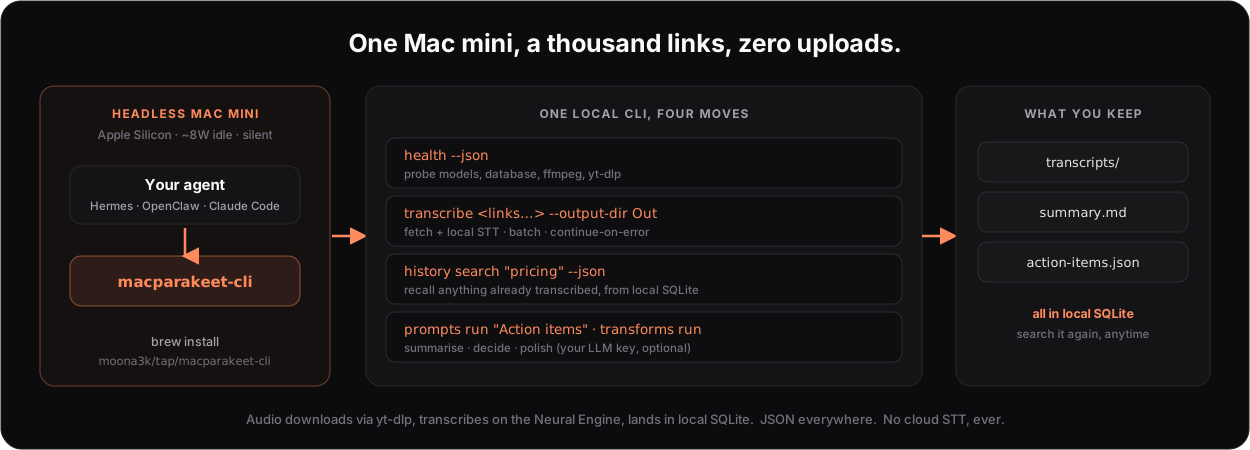
Why not just use a web tool?
Browser tools are quick for a short clip, but they upload your audio, cap free usage, and meter long files. Here's how MacParakeet compares to the apps people switch from.
| MacParakeet | WisprFlow | MacWhisper | |
|---|---|---|---|
| Price | Free open-source | $12-15/mo | $30 once |
| Free tier | Everything | 2,000 words/wk | No |
| Open-source | Yes GPL-3.0 | No | No |
| Local speech engine | Yes | Partial | Yes |
| Parakeet TDT (155x) | Yes | No | Added later |
| System dictation | Yes | Yes | Yes |
| Export formats | 7 formats | TXT | 5 formats |
| Video & podcast URLs | Yes | No | Yes |
| Speaker diarization | Yes | No | Yes |
| No account needed | Yes | No | Yes |
Got a short clip and don't want to install anything? Use the free in-browser transcriber or YouTube transcript tool — nothing uploaded.
Questions & answers
Which platforms can MacParakeet transcribe from a URL?
YouTube, Loom, Vimeo, TikTok, Facebook, Instagram, X (Twitter), Twitch, Apple Podcasts, SoundCloud — and roughly a thousand more. There's no fixed allowlist: if a link points to media the bundled yt-dlp can reach, MacParakeet tries it. Transcribe content you have the right to use.
Is it really local? The video comes from the internet.
The audio is downloaded from the source over the network — that one step needs a connection. The speech recognition then runs entirely on your Mac's Apple Neural Engine. Your audio is never uploaded to a transcription server, and there's no account.
Is there a length limit?
No. It runs locally at about 155x realtime, so a 3-hour video transcribes in roughly a minute. Browser tools usually cap the free tier at a few minutes; MacParakeet doesn't cap at all.
What does it cost?
Nothing. MacParakeet is free and open-source under GPL-3.0. No subscription, no per-minute fees, no account, no credit card.
What about private or password-protected videos?
Only content you can actually access. Private, login-only, or DRM-protected media — like Spotify-exclusive podcasts — generally can't be downloaded.
What Mac do I need?
macOS 14.2 or later with Apple Silicon (M1, M2, M3, or M4). Intel Macs are not supported because the Parakeet model runs on the Apple Neural Engine.
Can I do this from the command line or an AI agent?
Yes. macparakeet-cli transcribes the same URLs, batches a whole list with --output-dir, and emits JSON — built for headless and agent use. See the agent & CLI guide.
Paste your first link.
Free and open-source. Download MacParakeet, paste a URL, and watch a video become text on your Mac.
macOS 14.2+ · Apple Silicon · GPL-3.0